Add a member to MMS
This user guide will assist you in creating a member in MMS.
Goals
- Confidently create a member in MMS.
Getting started
- Gather all the information you need to create the member, e.g.;
- Trading name
- Membership numbers (Repco store number)
- Member type (member or affiliate)
- Contract expiry date
- Password
- Regional Manager
- Address
- Phone
- Login to MMS.
- Navigate to the members model.
Create a member
- Select create a new member to get started.

- On the create new member page, you will at a minimum need to fill out any details that are mandatory, these are marked with a *.

- If the member is ready to go also set is active to 'yes' under member details.
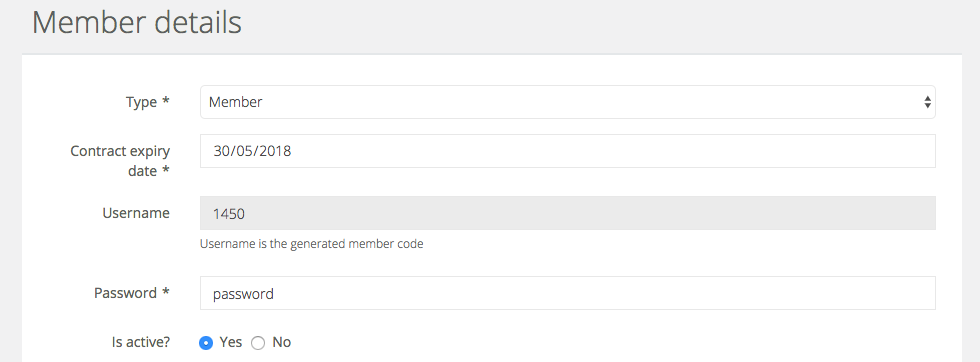
- If you would like to publish a member profile please skip to the next section. If you are creating an affiliate, you will need follow these steps to set up their website.
Publishing a profile
When a member is set to active you will also need to publish their profile to make it visible to customers.
- Set publish profile to 'yes' for a member;
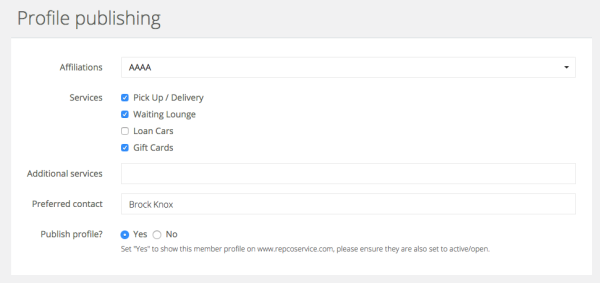
Please note that the member must also be set to active for the profile to be visible to the member.