Adding member comments
MMS has the ability to store comments specific to a member. The comments are a handy place to store ad-hoc information that you'd like to be shareable, findable and exportable. With comments you can:
- Categorise them
- Assign a support code to them (a reference to an external system)
- Record time (in minutes)
- Export comments (including category, support code and support time)
You can read more about how to use comments;
Goal
To centralise ad-hoc communication about a particular member and have that information exportable.
Add a comment
- Login to MMS.
- Navigate to the members model.
- Filter the list to find the member you wish to add a comment to.
- Click the members name to view the overview screen.
- On the overview screen, select the Comments tab then click the button.

- Complete all required fields:
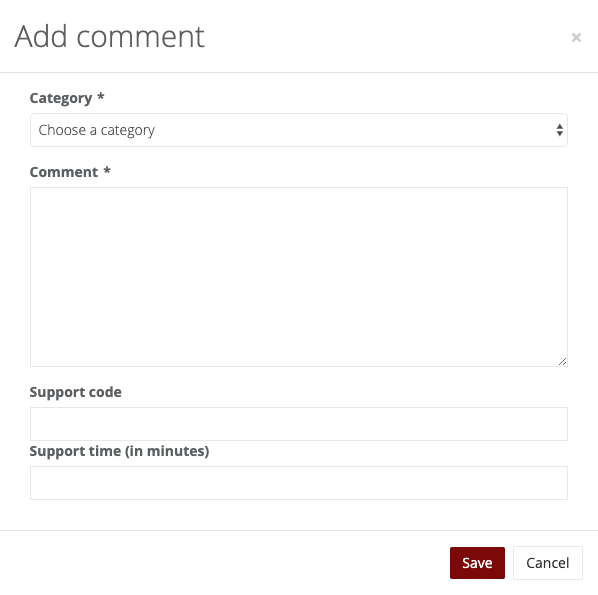 You can also optionally provide a support code (a reference to an external system), and support time spent (in minutes).
 - Click the _Save_ button.
 You can also optionally provide a support code (a reference to an external system), and support time spent (in minutes).
Export comments
You can export comments for easy reporting, sharing of information or integrating into other systems.
- Log into MMS.
- Navigate to the members model.
- Filter the list to find the member(s) you wish to export comments for.
- Click the Export > Comments button.
- Choose the categories you'd like to export, and optionally include the support fields in the export:
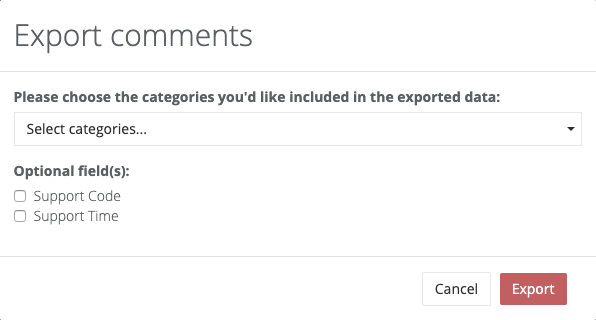
- Click the Export button to download a CSV file.
